
KelvinTrack on iPhone and iPad
The KelvinTrack app puts your cold-chain temperature monitoring in your pocket: install it on iPhone like an app, check your curves and receive alerts, even with the app closed. On Android, the same free app reads your KelvinTag sensors over Bluetooth and turns an Android 12 or newer phone, left on site, into the relay to your dashboard, with no subscription.
The essentials
The KelvinTrack app installs on iPhone from Safari in seconds, without going through the App Store, and receives temperature alerts even when closed from iOS 16.4 onwards. On Android, the free app on Google Play makes the phone the relay (gateway): an Android 12 or newer phone, left on site within Bluetooth range of the KelvinTag sensors, sends the readings over WiFi or mobile data to your dashboard, with no dedicated gateway to buy and no subscription. KelvinTag sensors are a one-time purchase, with no per-sensor subscription.
Updated July 2026.
Install the KelvinTrack app on iPhone, step by step
The KelvinTrack app for iPhone is an installable web app, also known as a PWA. It does not go through the App Store: you open kelvintrack.com in Safari, choose "Add to Home Screen", and installation takes a few seconds. You get an icon on your home screen, a full-screen display with no browser bar, and screens you have already opened stay available even without a connection. Day to day, nothing changes: you open the app, check your temperatures, receive your alerts. One important point: on iPhone, the app is your dashboard. It does not read sensors over Bluetooth; that role belongs to the relay, an Android 12 or newer phone running the free app and left on site. No App Store account, no heavy download: to get started, all you need is Safari and your KelvinTrack account. Learn more about progressive web apps.
Important: use Safari. On iPhone, "Add to Home Screen" is only available in Safari - not in Chrome or Firefox.
- 1
Open kelvintrack.com in Safari, Apple's browser.
- 2
Tap the Share button (the square with an up arrow) at the bottom of the screen.
- 3
Scroll down and choose "Add to Home Screen".
- 4
Tap "Add" in the top-right corner.
- 5
Open KelvinTrack from your home screen - just like a native app.
Get alarm alerts on your iPhone
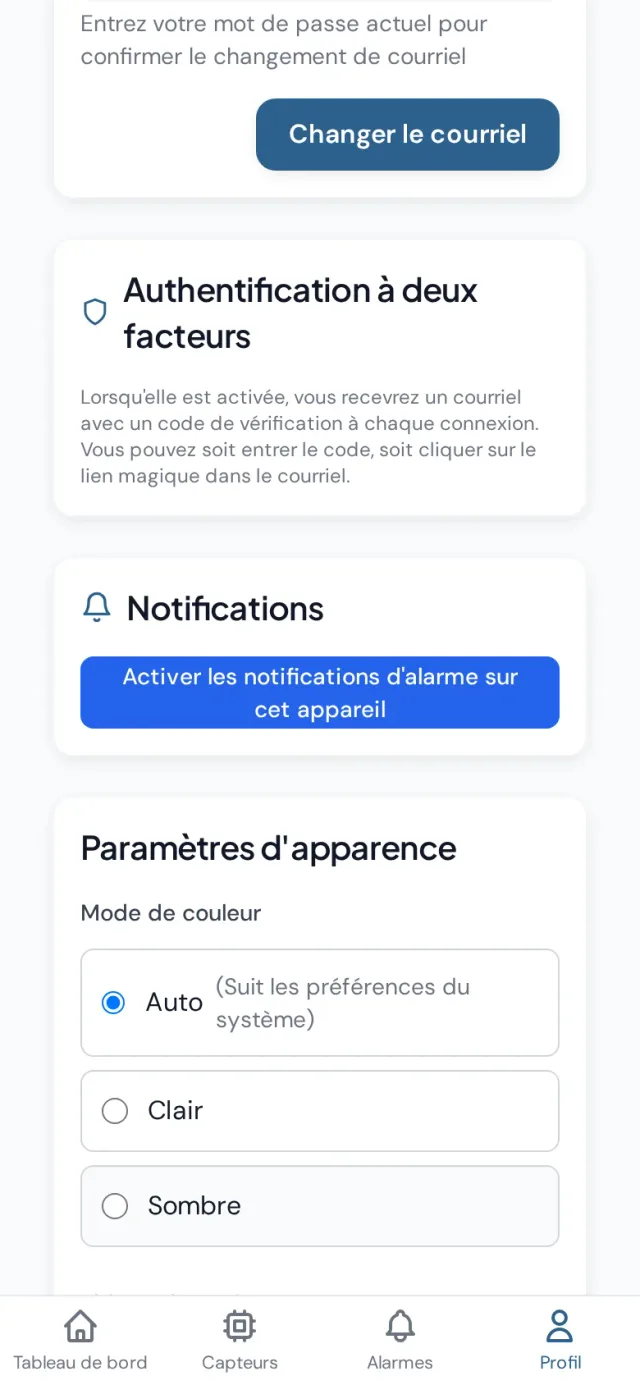
KelvinTrack temperature alerts use web push notifications (Web Push), supported on iPhone from iOS 16.4 onwards. Once the app is installed on your home screen and notifications are enabled from your Profile page, your iPhone receives alerts even when the app is closed: you do not need to keep it open or watch your dashboard, your phone notifies you as soon as a threshold is crossed. Activation is done device by device: each person on the team can enable alerts on their own iPhone from their account. And if you prefer a second safety net, alarms can also send an SMS and/or an email when a threshold is crossed, with multiple recipients possible. If in doubt, check in Settings, Notifications, KelvinTrack that notifications are allowed on your device.
- 1
Open KelvinTrack from your home-screen icon (not from Safari) and sign in.
- 2
Open your Profile page.
- 3
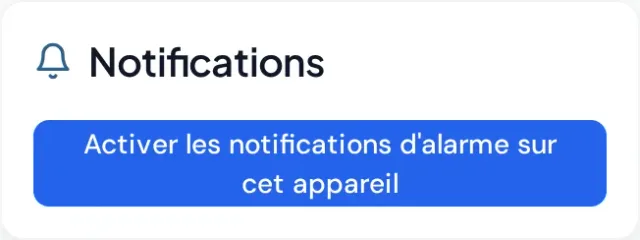
Tap "Enable alarm notifications on this device", then Allow.
- 4
Check in Settings → Notifications → KelvinTrack that notifications are allowed.
No notification coming through? Check that no Focus mode is filtering alerts, then remove the app from your home screen, reinstall it (steps above) and enable notifications again. Your iPhone sometimes keeps an old version of the app cached: reinstalling starts fresh and does not touch your data, your history lives on your dashboard.
Why install it on your iPhone
Feels like a native app
An icon on your home screen, full-screen, with no browser bar.
Push notifications
Get temperature alerts straight on your iPhone, even when the app is closed.
Offline access
Screens you have already opened stay available even without a connection.
On Android, your phone becomes the relay
The KelvinTrack app for Android, free on Google Play, plays a different role from the iPhone version: it makes the phone the relay (the gateway) between your sensors and your dashboard. The relay is an Android 12 or newer phone running the free KelvinTrack app, left on site within Bluetooth range of the sensors (up to 50 m depending on the environment); we recommend keeping it plugged in. It sends the readings over WiFi or mobile data to the dashboard, which alerts the people concerned by email, SMS and push notification, iPhones included. If it loses internet, readings are kept and upload once the connection returns, but no alert leaves the site in the meantime. No dedicated gateway to buy, no subscription for this setup.
- 1
Install the free KelvinTrack app on an Android 12 or newer phone.
- 2
Leave it on site, within range of your Kelvintag sensors, connected over WiFi or mobile data, and ideally plugged in.
- 3
Readings flow automatically to your dashboard. No subscription.
The same solution equips our customers in food service, pharmacy and logistics, with HACCP reports included (see the HACCP solution).
Available for free on Google Play
The app reads your KelvinTag sensors over Bluetooth and sends the readings to your dashboard.
The KelvinTag sensor: what the relay reads
The KelvinTag is the temperature sensor the relay reads over Bluetooth. It offers accuracy of up to ±0.05 °C: measurement quality ready for a DGCCRF inspection. Each sensor displays its calibrated accuracy when available; otherwise, an estimated accuracy from the sensor specification is shown. In the field, the housing is IP68 waterproof and operates from -40 °C to +85 °C, which covers freezers, cold rooms and refrigerated display cases. Its battery lasts 3 years and it comes with a 3-year warranty. Above all, the KelvinTag is a one-time purchase: there is no per-sensor subscription. Its readings are timestamped and feed HACCP-compliant PDF reports, exportable in one click for your audits. In short, the sensor provides the quality data; the app makes it readable and alerts you when a threshold is crossed.
KelvinTrack is a French solution, based in Montpellier: we designed the app and the KelvinTag sensor to work together, from the Bluetooth reading all the way to the audit report.
See KelvinTag sensors and up-to-date pricesThe relay phone day to day: what to know
The relay runs as a background service with a permanent notification, and restarts itself after the phone reboots, after an app update or after the app is swiped away; during setup the app guides the battery setting on Samsung, Xiaomi and OnePlus. At least 7 sensors per phone are guaranteed. If the phone leaves the site, the sensors keep recording to their memory and the readings catch up when it comes back, but no live alert can leave while it is away: a dedicated Android phone left on site is the right setup. If the phone stops working, the sensors keep recording and the dashboard shows them as offline after 4 hours (warning after 1 hour), but no email, SMS or push notification is sent about the relay itself. A dedicated 5G gateway (Poliponet) is in preparation; it cannot be ordered yet.
| Android relay phone | |
|---|---|
| Cost | Free: app available on Google Play, no subscription |
| Hardware required | An Android 12 or newer phone, left on site; ideally plugged in |
| Connectivity | WiFi or mobile data |
| Range | Bluetooth, up to 50 m depending on the environment |
| Capacity | At least 7 sensors per phone, guaranteed |
| Internet outage | Readings kept, sent when the connection returns; no alert leaves in the meantime |
| Phone stopped | Sensors keep recording; the dashboard shows them offline after 4 h, with no email, SMS or push |
The table below sums up the essentials; each case is detailed on the Android app page. How the relay works
One account, several devices: iPhone, iPad, computer
Because KelvinTrack is a web app, your temperature data does not live in a single phone: it sits on your dashboard, accessible from any browser. You can therefore install the app on your iPhone and on your iPad with the same Safari steps, check the dashboard from the office computer, and find the same sensors, the same curves and the same alarms everywhere. Push notifications are enabled device by device, from the Profile page: everyone chooses where they want to be alerted. For critical alerts, alarms can also notify multiple recipients by SMS and/or email, so the manager and their deputy are both informed. Monitoring itself does not depend on any of your screens: the relay phone, left on site, reads the sensors and tracking runs 24/7, whether the app is open or not. The result: peace of mind, wherever you are.
What the KelvinTrack app costs: the no-per-sensor-subscription model
The model is easy to remember: the apps are free, the sensors are a one-time purchase. The iPhone app installs freely from Safari, the Android app is free on Google Play, and there is no per-sensor subscription: a KelvinTag you buy is yours, with its 3-year warranty. With an Android 12 or newer phone as the relay, there is no dedicated gateway to buy and no subscription for this setup. Sensor prices are shown on the products page, always up to date.
See the shop and catalog pricesFrequently asked questions about the KelvinTrack app
Can I install the KelvinTrack app from Chrome on iPhone?
- No. On iPhone, the "Add to Home Screen" option is only offered in Safari, Apple's browser. Open kelvintrack.com in Safari, tap the Share button, then choose "Add to Home Screen". Installation takes a few seconds and the icon appears immediately on your home screen, like a regular app.
Will I receive alerts if the app is closed?
- Yes. Once the app is installed from Safari and opened from its icon, enable notifications from your Profile page. Your iPhone then receives temperature alerts even with the app closed. This feature relies on Web Push notifications and requires iOS 16.4 or later. If in doubt, check the permission in Settings, Notifications, KelvinTrack.
What kind of Android phone do I need as a gateway?
- An Android 12 or newer phone: an older model only works if it runs at least Android 12. Install the free app from Google Play and leave the phone on site, within Bluetooth range of the sensors (up to 50 m depending on the environment), connected over WiFi or mobile data; we recommend keeping it plugged in. It reads the sensors and sends the readings to your dashboard, with no subscription for this setup. A personal phone also works, but if it leaves the site the sensors are out of range: a dedicated phone left on site is better.
Is the KelvinTrack app really free?
- The apps are free: the iPhone version installs freely from Safari and the Android version is free on Google Play. KelvinTag sensors are a one-time purchase, with no per-sensor subscription. The relay is an Android 12 or newer phone running the free app: no gateway to buy. Up-to-date prices are shown on the products page.
What happens if my WiFi or internet goes down?
- The relay phone sends readings over WiFi or mobile data. If it loses internet, readings are kept on the phone and upload once the connection returns: no reading is lost. However, no alert leaves the site while it is offline; the alerts arrive once the connection is back.
Can I try KelvinTrack before buying?
- The apps are free and the sensors are a one-time purchase, with no per-sensor subscription. The relay is an Android 12 or newer phone running the free app.
Does the iPhone app read my sensors over Bluetooth?
- No. On iPhone, the app is your dashboard: it displays temperatures, curves and alarms, and receives notifications. Bluetooth reading of the KelvinTag sensors is handled by the relay: an Android 12 or newer phone running the free app and left on site. An iPhone cannot be the relay; it receives alerts via Web Push notifications.
Are these records enough for my HACCP monitoring and an inspection?
- European regulation 852/2004 requires temperature monitoring but does not impose a method. KelvinTrack records timestamped data and produces HACCP-compliant PDF reports, exportable in one click for audits. The KelvinTag sensor, with accuracy of up to ±0.05 °C, is ready for a DGCCRF inspection.
Does the app work on iPad?
- Yes. KelvinTrack installs on iPad exactly as on iPhone: open kelvintrack.com in Safari, tap the Share button, then "Add to Home Screen". The dashboard, alarms and reports are the same; only the layout adapts to the screen size.
What happens if I change or lose my phone?
- You lose no data. Temperature history, alarms and reports live on your KelvinTrack dashboard, not in the device. On a new iPhone, reinstall the application from Safari and sign back in; on a new relay phone (Android 12 or newer), reinstall the application from Google Play and leave it on site, within range of the sensors. While the relay is missing, the sensors keep recording and their readings catch up as soon as it is back, but no alert goes out. Just remember to re-enable push notifications on the new device, from your profile.
References: Regulation (EC) No 852/2004 on EUR-Lex · progressive web apps (Wikipedia). Another question? Contact the KelvinTrack team.
In summary
The KelvinTrack app installs on iPhone from Safari in seconds, without going through the App Store.
Alarm push notifications work even with the app closed, from iOS 16.4.
On Android, the free app turns an Android 12 or newer phone, left on site, into the relay that reads KelvinTag sensors over Bluetooth, with no subscription.
The relay sends readings over WiFi or mobile data; if it loses internet, readings are kept, but no alert leaves until the connection returns.
Sensors are a one-time purchase, with no per-sensor subscription.
Ready to monitor from your iPhone?
Open KelvinTrack in Safari on your iPhone, then follow the steps above.
Open KelvinTrack